

 Talos
Talos Omni
Omni Kubernetes Guides
Configuring Wireguard Network
Quick Start
The quickest way to try out Wireguard is to usetalosctl cluster create command:
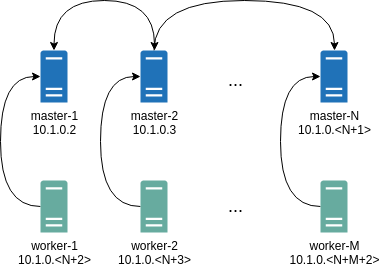
PersistentKeepalive to 5 seconds to establish controlplanes to workers connection.
After the cluster is deployed it should be possible to verify Wireguard network connectivity.
It is possible to deploy a container with hostNetwork enabled, then do kubectl exec <container> /bin/bash and either do:
wireguard-tools package and run:
Manual Configuration
All Wireguard configuration can be done by changing Talos machine config files. As an example we will use this official Wireguard quick start tutorial.Key Generation
This part is exactly the same:Setting up Device
Inline comments show relations between configs andwg quickstart tutorial commands:
networkd gets this configuration it will create the device, configure it and will bring it up (equivalent to ip link set up dev wg0).
All supported config parameters are described in the Machine Config Reference.