

 Talos
Talos Omni
Omni Kubernetes Guides
time.cloudflare.com as the default NTP server for time synchronization.
You can override this default in two ways:
- Using kernel parameters
- Using cluster configuration patches
Kernel parameters
Use kernel parameters when you need to override NTP before the machine configuration is loaded, for example, during a bare-metal ISO, PXE boot, or when a node cannot reach the default NTP server early in the boot process. Kernel parameters can be used to configure initial network settings such as interfaces, routes, DNS, and NTP servers. For more details, see the kernel documentation. The kernel parameter uses the following syntax:time.cloudflare.com) with 172.235.60.8, you can specify only the NTP field and leave the rest empty:
ip value as a kernel parameter during boot to override the NTP server early in the startup process.
To do this first download the installation media baked with the ip value:
- CLI
- UI
Download the installation media with the
ip kernel parameter using the Omni CLI: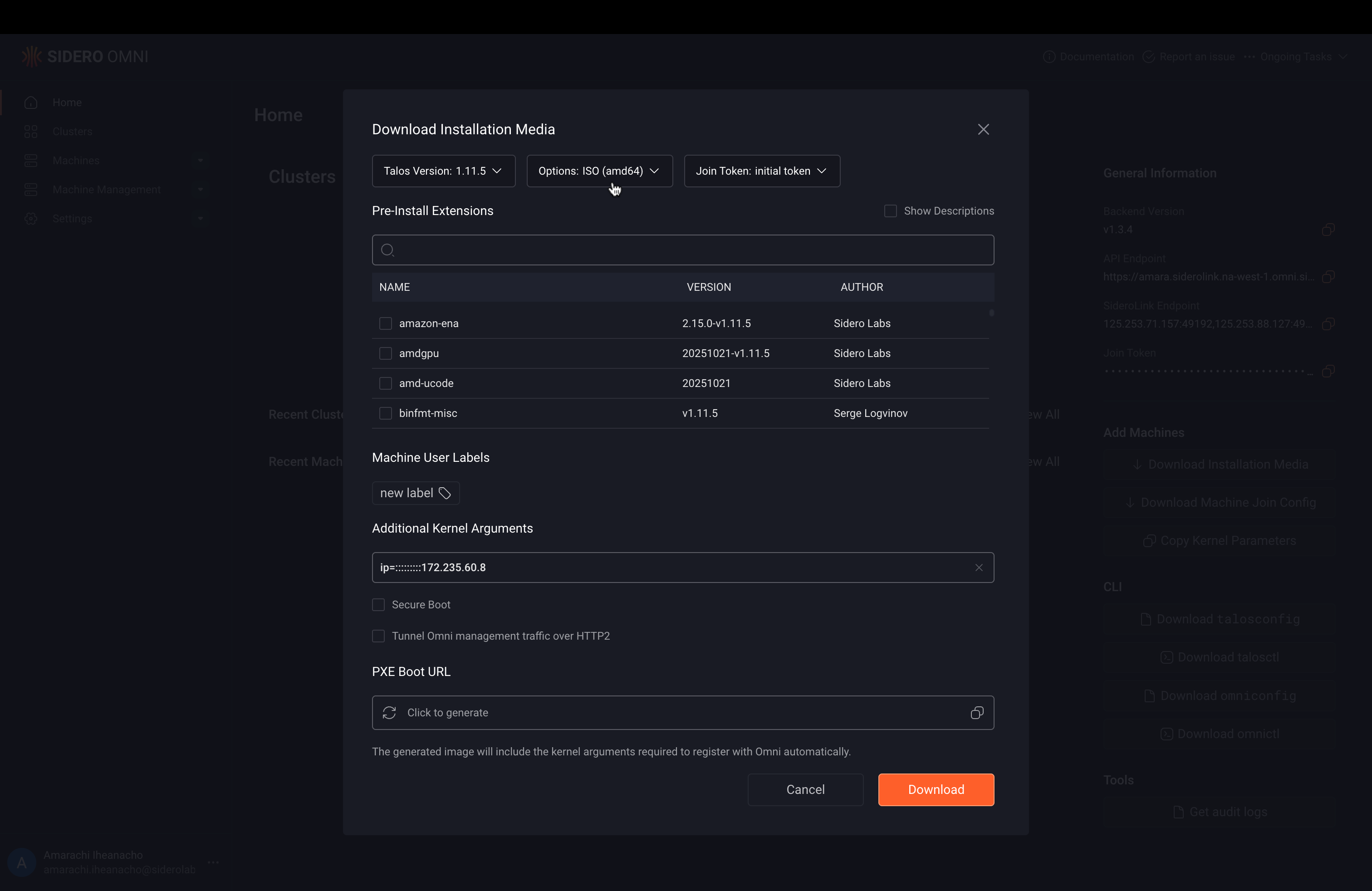
<NODE_IP> with your node’s IP address and running:
Config patches
Use config patches to override NTP servers after boot on a running cluster. For example, to replace the default NTP server with 172.235.60.8, apply the following patch to your cluster using the cluster machine patch workflow.<NODE_IP> with the IP address of one of your nodes: