

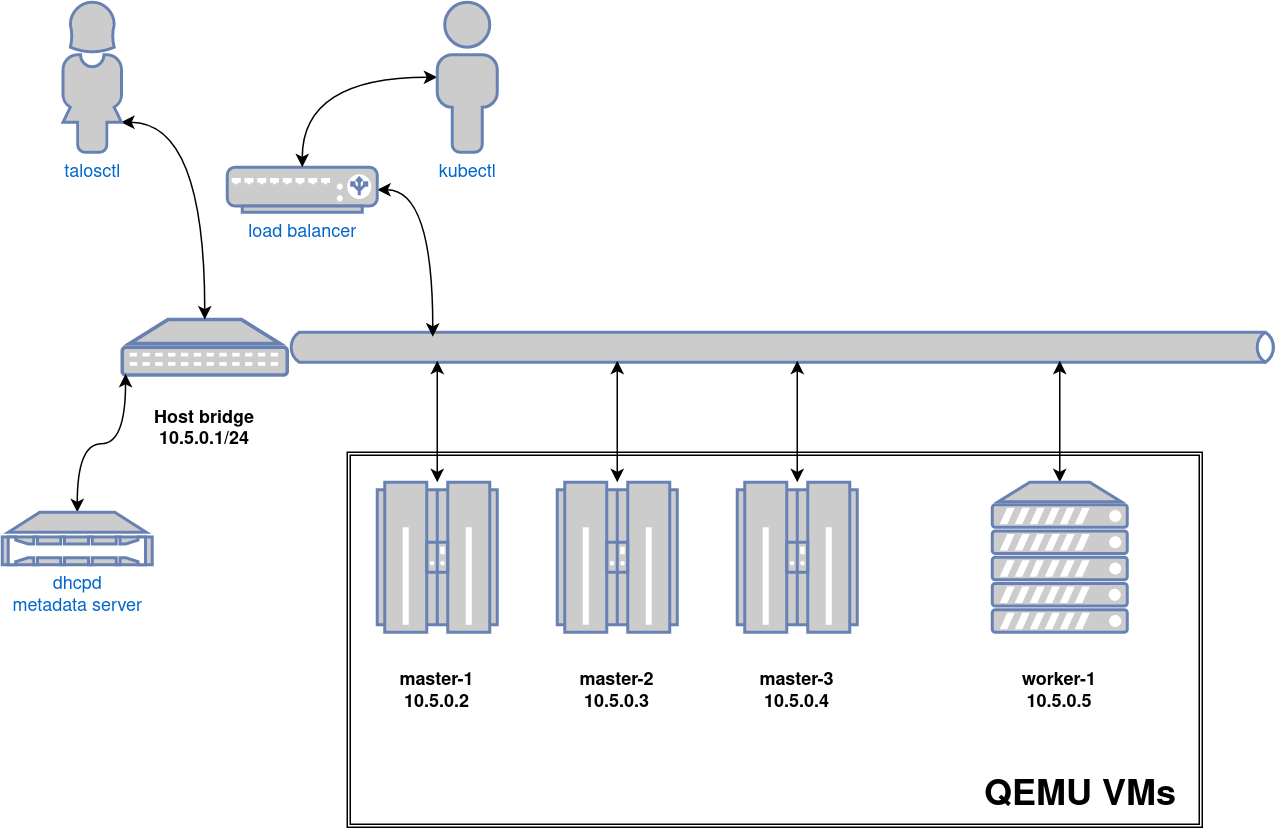
Requirements
- linux
- macOS
- QEMU
- a kernel with
- KVM enabled (
/dev/kvmmust exist) CONFIG_NET_SCH_NETEMenabledCONFIG_NET_SCH_INGRESSenabled
- KVM enabled (
- at least
CAP_SYS_ADMINandCAP_NET_ADMINcapabilities bridge,staticandfirewallCNI plugins from the standard CNI plugins, andtc-redirect-tapCNI plugin from the awslabs tc-redirect-tap installed to/opt/cni/bin(installed automatically bytalosctl)- iptables
/var/run/netnsdirectory should exist
Installation
How to get QEMU
Install QEMU with your operating system package manager.- linux
- macOS
For example, on Ubuntu for x86:
Install talosctl
You can downloadtalosctl on MacOS and Linux via:
Create the cluster
For the first time, create root state directory as your user so that you can inspect the logs as non-root user:talosctl will download the CNI bundle for the VM provisioning and install it to ~/.talos/cni directory.
Once the above finishes successfully, your talosconfig (~/.talos/config) will be configured to point to the new cluster, and kubeconfig will be
downloaded and merged into default kubectl config location (~/.kube/config).
Presets
Thetalosctl cluster create qemu command has various presets available via the --presets flag to modify behavior.
See reference documentation for more details.
Image factory schematic
Optionally a custom Image Factory schematic ID can be provided via the--schematic-id flag.
Omni
Theomni-api-endpoint flag configures nodes to connect to an Omni instance once booted.
Using SideroLink, the local QEMU nodes can communicate with Omni as long as the endpoint is reachable.
This enables connections to a local Omni instance, a cloud-hosted Omni instance, or a Sidero SaaS Omni instance.
Using the cluster
Once the cluster is available, you can make use oftalosctl and kubectl to interact with the cluster.
For example, to view current running containers, run talosctl -n 10.5.0.2 containers for a list of containers in the system namespace, or talosctl -n 10.5.0.2 containers --namespace=cri for Kubernetes workloads.
To view the logs of a container, use talosctl -n 10.5.0.2 logs <container> or talosctl -n 10.5.0.2 logs --namespace=cri <container>.
A bridge interface will be created, and assigned the default IP 10.5.0.1.
Each node will be directly accessible on the subnet specified at cluster creation time.
A loadbalancer runs on 10.5.0.1 by default, which handles loadbalancing for the Kubernetes APIs.
You can see a summary of the cluster state by running:
Cleaning up
To cleanup, run:
Note: In that case that the host machine is rebooted before destroying the cluster, you may need to manually remove ~/.talos/clusters/talos-default.
Manual clean up
Thetalosctl cluster destroy command depends heavily on the clusters state directory.
It contains all related information of the cluster.
The PIDs and network associated with the cluster nodes.
If you happened to have deleted the state folder by mistake or you would like to cleanup
the environment, here are the steps how to do it manually:
Remove VM launchers
Find the process oftalosctl qemu-launch:
Stopping VMs
Find the process ofqemu-system:
Remove load balancer
Find the process oftalosctl loadbalancer-launch:
Remove DHCP server
Find the process oftalosctl dhcpd-launch:
Remove network
- linux
- macOS
This is more tricky part as if you have already deleted the state folder.
If you didn’t then it is written in the If you only had one cluster, then it will be the interface with name
To remove this interface:
state.yaml in the
~/.talos/clusters/<cluster-name> directory.talos<uuid>Remove state directory
To remove the state directory execute:Troubleshooting
Logs
Inspect logs directory<cluster-name>-<role>-<node-id>.log
For example in case of k8s cluster name:
How it works
Linux
On Linux the KVM accelerator is utilized. Networking is created using the CNI plugins. For DHCP a custom server is used.MacOS
On Macos thehvf accelerator (Apple Hypervisor Framework) is utilized.
Networking is created by QEMU via the apple vmnet framework which handles everything but the DHCP for which a custom server is used instead.