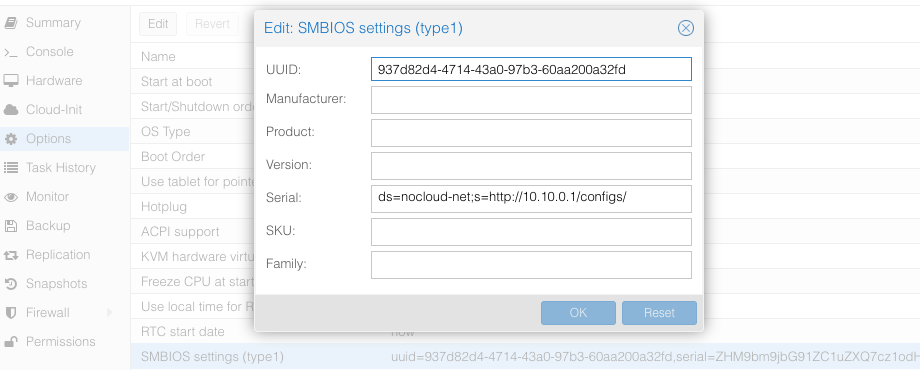
 You can read the VM config from a `root` shell with the command `qm config $ID` (`$ID` - VM ID number of virtual machine), you will see something like:
```shellsession theme={null}
# qm config $ID
...
smbios1: uuid=5b0f7dcf-cfe3-4bf3-87a2-1cad29bd51f9,serial=ZHM9bm9jbG91ZC1uZXQ7cz1odHRwOi8vMTAuMTAuMC4xL2NvbmZpZ3Mv,base64=1
...
```
Where serial holds the base64-encoded string version of `ds=nocloud-net;s=http://10.10.0.1/configs/`.
The serial can also be set from a `root` shell on the Proxmox server:
```shellsession theme={null}
# qm set $VM --smbios1 "uuid=5b0f7dcf-cfe3-4bf3-87a2-1cad29bd51f9,serial=$(printf '%s' 'ds=nocloud-net;s=http://10.10.0.1/configs/' | base64),base64=1"
update VM 105: -smbios1 uuid=5b0f7dcf-cfe3-4bf3-87a2-1cad29bd51f9,serial=ZHM9bm9jbG91ZC1uZXQ7cz1odHRwOi8vMTAuMTAuMC4xL2NvbmZpZ3Mv,base64=1
```
Keep in mind that if you set the serial from the command line, you must encode it as base64, and you must include the UUID and any other settings that are already set for the `smbios1` option or they will be removed.
### CDROM/USB
Talos can also get machine config from local attached storage without any prior network connection being established.
You can provide configs to the server via files on a VFAT or ISO9660 filesystem.
The filesystem volume label must be `cidata` or `CIDATA`.
#### Example: QEMU
Create and prepare Talos machine config:
```bash theme={null}
export CONTROL_PLANE_IP=192.168.1.10
talosctl gen config talos-nocloud https://$CONTROL_PLANE_IP:6443 --output-dir _out
```
Prepare cloud-init configs:
```bash theme={null}
mkdir -p iso
mv _out/controlplane.yaml iso/user-data
echo "local-hostname: controlplane-1" > iso/meta-data
cat > iso/network-config << EOF
version: 1
config:
- type: physical
name: eth0
mac_address: "52:54:00:12:34:00"
subnets:
- type: static
address: 192.168.1.10
netmask: 255.255.255.0
gateway: 192.168.1.254
EOF
```
Create cloud-init iso image
```bash theme={null}
cd iso && genisoimage -output cidata.iso -V cidata -r -J user-data meta-data network-config
```
Start the VM
```bash theme={null}
qemu-system-x86_64 \
...
-cdrom iso/cidata.iso \
...
```
#### Example: Proxmox
Proxmox can create cloud-init disk [for you](https://pve.proxmox.com/wiki/Cloud-Init_Support).
Edit the cloud-init config information in Proxmox as follows, substitute your own information as necessary:
You can read the VM config from a `root` shell with the command `qm config $ID` (`$ID` - VM ID number of virtual machine), you will see something like:
```shellsession theme={null}
# qm config $ID
...
smbios1: uuid=5b0f7dcf-cfe3-4bf3-87a2-1cad29bd51f9,serial=ZHM9bm9jbG91ZC1uZXQ7cz1odHRwOi8vMTAuMTAuMC4xL2NvbmZpZ3Mv,base64=1
...
```
Where serial holds the base64-encoded string version of `ds=nocloud-net;s=http://10.10.0.1/configs/`.
The serial can also be set from a `root` shell on the Proxmox server:
```shellsession theme={null}
# qm set $VM --smbios1 "uuid=5b0f7dcf-cfe3-4bf3-87a2-1cad29bd51f9,serial=$(printf '%s' 'ds=nocloud-net;s=http://10.10.0.1/configs/' | base64),base64=1"
update VM 105: -smbios1 uuid=5b0f7dcf-cfe3-4bf3-87a2-1cad29bd51f9,serial=ZHM9bm9jbG91ZC1uZXQ7cz1odHRwOi8vMTAuMTAuMC4xL2NvbmZpZ3Mv,base64=1
```
Keep in mind that if you set the serial from the command line, you must encode it as base64, and you must include the UUID and any other settings that are already set for the `smbios1` option or they will be removed.
### CDROM/USB
Talos can also get machine config from local attached storage without any prior network connection being established.
You can provide configs to the server via files on a VFAT or ISO9660 filesystem.
The filesystem volume label must be `cidata` or `CIDATA`.
#### Example: QEMU
Create and prepare Talos machine config:
```bash theme={null}
export CONTROL_PLANE_IP=192.168.1.10
talosctl gen config talos-nocloud https://$CONTROL_PLANE_IP:6443 --output-dir _out
```
Prepare cloud-init configs:
```bash theme={null}
mkdir -p iso
mv _out/controlplane.yaml iso/user-data
echo "local-hostname: controlplane-1" > iso/meta-data
cat > iso/network-config << EOF
version: 1
config:
- type: physical
name: eth0
mac_address: "52:54:00:12:34:00"
subnets:
- type: static
address: 192.168.1.10
netmask: 255.255.255.0
gateway: 192.168.1.254
EOF
```
Create cloud-init iso image
```bash theme={null}
cd iso && genisoimage -output cidata.iso -V cidata -r -J user-data meta-data network-config
```
Start the VM
```bash theme={null}
qemu-system-x86_64 \
...
-cdrom iso/cidata.iso \
...
```
#### Example: Proxmox
Proxmox can create cloud-init disk [for you](https://pve.proxmox.com/wiki/Cloud-Init_Support).
Edit the cloud-init config information in Proxmox as follows, substitute your own information as necessary:
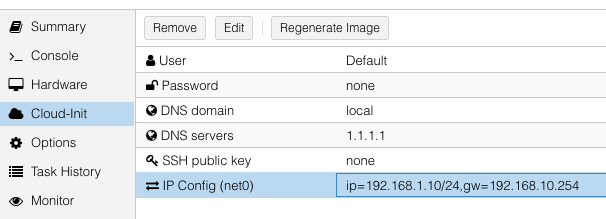 and then add a `cicustom` param to the virtual machine's configuration from a `root` shell:
```shellsession theme={null}
# qm set 100 --cicustom user=local:snippets/controlplane-1.yml
update VM 100: -cicustom user=local:snippets/controlplane-1.yml
```
> Note: `snippets/controlplane-1.yml` is Talos machine config.
> It is usually located at `/var/lib/vz/snippets/controlplane-1.yml`.
> This file must be placed to this path manually, as Proxmox does not support snippet uploading via API/GUI.
Click on `Regenerate Image` button after the above changes are made.
and then add a `cicustom` param to the virtual machine's configuration from a `root` shell:
```shellsession theme={null}
# qm set 100 --cicustom user=local:snippets/controlplane-1.yml
update VM 100: -cicustom user=local:snippets/controlplane-1.yml
```
> Note: `snippets/controlplane-1.yml` is Talos machine config.
> It is usually located at `/var/lib/vz/snippets/controlplane-1.yml`.
> This file must be placed to this path manually, as Proxmox does not support snippet uploading via API/GUI.
Click on `Regenerate Image` button after the above changes are made.