;
};
Talos implements concepts of *resources* and *controllers* to facilitate internal operations of the operating system.
Talos resources and controllers are very similar to Kubernetes resources and controllers, but there are some differences.
The content of this document is not required to operate Talos, but it is useful for troubleshooting.
Starting with Talos 0.9, most of the Kubernetes control plane bootstrapping and operations is implemented via controllers and resources which allows Talos to be reactive to configuration changes, environment changes (e.g. time sync).
## Resources
A resource captures a piece of system state.
Each resource belongs to a "Type" which defines resource contents.
Resource state can be split in two parts:
* metadata: fixed set of fields describing resource - namespace, type, ID, etc.
* spec: contents of the resource (depends on resource type).
Resource is uniquely identified by (`namespace`, `type`, `id`).
Namespaces provide a way to avoid conflicts on duplicate resource IDs.
At the moment of this writing, all resources are local to the node and stored in memory.
So on every reboot resource state is rebuilt from scratch (the only exception is `MachineConfig` resource which reflects current machine config).
## Controllers
Controllers run as independent lightweight threads in Talos.
The goal of the controller is to reconcile the state based on inputs and eventually update outputs.
A controller can have any number of resource types (and namespaces) as inputs.
In other words, it watches specified resources for changes and reconciles when these changes occur.
A controller might also have additional inputs: running reconcile on schedule, watching `etcd` keys, etc.
A controller has a single output: a set of resources of fixed type in a fixed namespace.
Only one controller can manage resource type in the namespace, so conflicts are avoided.
## Querying resources
Talos CLI tool `talosctl` provides read-only access to the resource API which includes getting specific resource,
listing resources and watching for changes.
Talos stores resources describing resource types and namespaces in `meta` namespace:
```bash theme={null}
$ talosctl get resourcedefinitions
NODE NAMESPACE TYPE ID VERSION
172.20.0.2 meta ResourceDefinition bootstrapstatuses.v1alpha1.talos.dev 1
172.20.0.2 meta ResourceDefinition etcdsecrets.secrets.talos.dev 1
172.20.0.2 meta ResourceDefinition kubernetescontrolplaneconfigs.config.talos.dev 1
172.20.0.2 meta ResourceDefinition kubernetessecrets.secrets.talos.dev 1
172.20.0.2 meta ResourceDefinition machineconfigs.config.talos.dev 1
172.20.0.2 meta ResourceDefinition machinetypes.config.talos.dev 1
172.20.0.2 meta ResourceDefinition manifests.kubernetes.talos.dev 1
172.20.0.2 meta ResourceDefinition manifeststatuses.kubernetes.talos.dev 1
172.20.0.2 meta ResourceDefinition namespaces.meta.cosi.dev 1
172.20.0.2 meta ResourceDefinition resourcedefinitions.meta.cosi.dev 1
172.20.0.2 meta ResourceDefinition rootsecrets.secrets.talos.dev 1
172.20.0.2 meta ResourceDefinition secretstatuses.kubernetes.talos.dev 1
172.20.0.2 meta ResourceDefinition services.v1alpha1.talos.dev 1
172.20.0.2 meta ResourceDefinition staticpods.kubernetes.talos.dev 1
172.20.0.2 meta ResourceDefinition staticpodstatuses.kubernetes.talos.dev 1
172.20.0.2 meta ResourceDefinition timestatuses.v1alpha1.talos.dev 1
```
```bash theme={null}
$ talosctl get namespaces
NODE NAMESPACE TYPE ID VERSION
172.20.0.2 meta Namespace config 1
172.20.0.2 meta Namespace controlplane 1
172.20.0.2 meta Namespace meta 1
172.20.0.2 meta Namespace runtime 1
172.20.0.2 meta Namespace secrets 1
```
Most of the time namespace flag (`--namespace`) can be omitted, as `ResourceDefinition` contains default
namespace which is used if no namespace is given:
```bash theme={null}
$ talosctl get resourcedefinitions resourcedefinitions.meta.cosi.dev -o yaml
node: 172.20.0.2
metadata:
namespace: meta
type: ResourceDefinitions.meta.cosi.dev
id: resourcedefinitions.meta.cosi.dev
version: 1
phase: running
spec:
type: ResourceDefinitions.meta.cosi.dev
displayType: ResourceDefinition
aliases:
- resourcedefinitions
- resourcedefinition
- resourcedefinitions.meta
- resourcedefinitions.meta.cosi
- rd
- rds
printColumns: []
defaultNamespace: meta
```
Resource definition also contains type aliases which can be used interchangeably with canonical resource name:
```bash theme={null}
$ talosctl get ns config
NODE NAMESPACE TYPE ID VERSION
172.20.0.2 meta Namespace config 1
```
### Output
Command `talosctl get` supports following output modes:
* `table` (default) prints resource list as a table
* `yaml` prints pretty formatted resources with details, including full metadata spec.
This format carries most details from the backend resource (e.g. comments in `MachineConfig` resource)
* `json` prints same information as `yaml`, some additional details (e.g. comments) might be lost.
This format is useful for automated processing with tools like `jq`.
### Watching changes
If flag `--watch` is appended to the `talosctl get` command, the command switches to watch mode.
If list of resources was requested, `talosctl` prints initial contents of the list and then appends resource information for every change:
```bash theme={null}
$ talosctl get svc -w
NODE * NAMESPACE TYPE ID VERSION RUNNING HEALTHY
172.20.0.2 + runtime Service timed 2 true true
172.20.0.2 + runtime Service trustd 2 true true
172.20.0.2 + runtime Service udevd 2 true true
172.20.0.2 - runtime Service timed 2 true true
172.20.0.2 + runtime Service timed 1 true false
172.20.0.2 runtime Service timed 2 true true
```
Column `*` specifies event type:
* `+` is created
* `-` is deleted
* ` ` is updated
In YAML/JSON output, field `event` is added to the resource representation to describe the event type.
### Examples
Getting machine config:
```bash theme={null}
$ talosctl get machineconfig v1alpha1 -o yaml
node: 172.20.0.2
metadata:
namespace: config
type: MachineConfigs.config.talos.dev
id: v1alpha1
version: 2
phase: running
spec:
version: v1alpha1 # Indicates the schema used to decode the contents.
debug: false # Enable verbose logging to the console.
persist: true # Indicates whether to pull the machine config upon every boot.
# Provides machine specific configuration options.
...
```
Getting control plane static pod statuses:
```bash theme={null}
$ talosctl get staticpodstatus
NODE NAMESPACE TYPE ID VERSION READY
172.20.0.2 controlplane StaticPodStatus kube-system/kube-apiserver-talos-default-controlplane-1 3 True
172.20.0.2 controlplane StaticPodStatus kube-system/kube-controller-manager-talos-default-controlplane-1 3 True
172.20.0.2 controlplane StaticPodStatus kube-system/kube-scheduler-talos-default-controlplane-1 4 True
```
Getting static pod definition for `kube-apiserver`:
```bash theme={null}
$ talosctl get sp kube-apiserver -n 172.20.0.2 -o yaml
node: 172.20.0.2
metadata:
namespace: controlplane
type: StaticPods.kubernetes.talos.dev
id: kube-apiserver
version: 3
phase: running
finalizers:
- k8s.StaticPodStatus("kube-apiserver")
spec:
apiVersion: v1
kind: Pod
metadata:
annotations:
talos.dev/config-version: "1"
talos.dev/secrets-version: "2"
...
```
## Inspecting controller dependencies
Talos can report current dependencies between controllers and resources for debugging purposes:
```bash theme={null}
$ talosctl inspect dependencies
digraph {
n1[label="config.K8sControlPlaneController",shape="box"];
n3[label="config.MachineTypeController",shape="box"];
n2[fillcolor="azure2",label="config:KubernetesControlPlaneConfigs.config.talos.dev",shape="note",style="filled"];
...
```
This outputs graph in `graphviz` format which can be rendered to PNG with command:
```bash theme={null}
talosctl inspect dependencies | dot -T png > deps.png
```
Graph can be enhanced by replacing resource types with actual resource instances:
```bash theme={null}
talosctl inspect dependencies --with-resources | dot -T png > deps.png
```
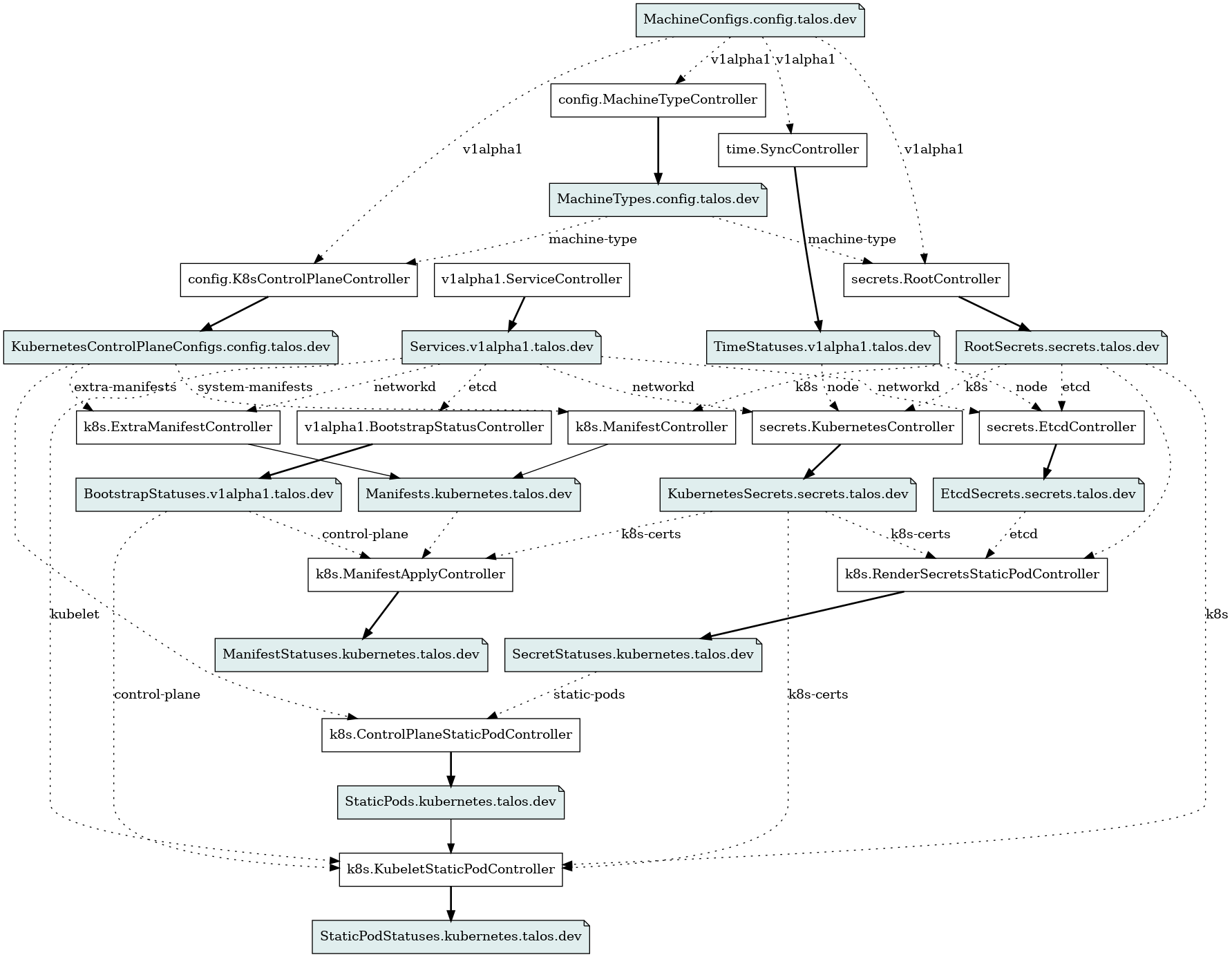 Graph can be enhanced by replacing resource types with actual resource instances:
```bash theme={null}
talosctl inspect dependencies --with-resources | dot -T png > deps.png
```
Graph can be enhanced by replacing resource types with actual resource instances:
```bash theme={null}
talosctl inspect dependencies --with-resources | dot -T png > deps.png
```
