> ## Documentation Index
> Fetch the complete documentation index at: https://docs.siderolabs.com/llms.txt
> Use this file to discover all available pages before exploring further.

# Pull Through Image Cache

> How to set up local transparent container images caches.

export const VersionWarningBanner = () => {
  const latestVersion = "v1.13";
  const [latestUrl, setLatestUrl] = useState(null);
  const [currentVersion, setCurrentVersion] = useState(null);
  const [isBeta, setIsBeta] = useState(false);
  const parseVersion = v => v.replace("v", "").split(".").map(Number);
  const isGreaterVersion = (a, b) => {
    const [aMajor, aMinor] = parseVersion(a);
    const [bMajor, bMinor] = parseVersion(b);
    if (aMajor > bMajor) return true;
    if (aMajor === bMajor && aMinor > bMinor) return true;
    return false;
  };
  useEffect(() => {
    if (typeof window === "undefined") return;
    const {pathname, hash, search} = window.location;
    const match = pathname.match(/\/talos\/(v\d+\.\d+)\//);
    if (!match) return;
    const detectedVersion = match[1];
    if (detectedVersion === latestVersion) return;
    setCurrentVersion(detectedVersion);
    if (isGreaterVersion(detectedVersion, latestVersion)) {
      setIsBeta(true);
    }
    const newPath = pathname.replace(`/talos/${detectedVersion}/`, `/talos/${latestVersion}/`);
    setLatestUrl(`${newPath}${search}${hash}`);
  }, []);
  if (!latestUrl || !currentVersion) return null;
  return <div className="not-prose sticky top-6 z-50 my-6">
      <div className="border border-yellow-500/30 bg-yellow-500/10 px-4 py-3 rounded-xl">
        <div className="text-sm">
          {isBeta ? <>
              ⚠️ You are viewing a <strong>beta version</strong> of Talos ({currentVersion}).
              This version may be unstable.
              <a href={latestUrl} className="ml-2 underline text-yellow-400 hover:text-yellow-300 font-medium">
                View latest stable version {latestVersion} →
              </a>
            </> : <>
              ⚠️ You are viewing an older version of Talos ({currentVersion}).
              <a href={latestUrl} className="ml-2 underline text-yellow-400 hover:text-yellow-300 font-medium">
                View the latest version {latestVersion} →
              </a>
            </>}
        </div>
      </div>
    </div>;
};

<VersionWarningBanner />

In this guide we will create a set of local caching Docker registry proxies to minimize local cluster startup time.

When running Talos locally, pulling images from container registries might take a significant amount of time.
We spin up local caching pass-through registries to cache images and configure a local Talos cluster to use those proxies.
A similar approach might be used to run Talos in production in air-gapped environments.
It can be also used to verify that all the images are available in local registries.

## Video Walkthrough

To see a live demo of this writeup, see the video below:

<iframe width="560" height="315" src="https://www.youtube.com/embed/PRiQJR9Q33s" frameborder="0" allow="accelerometer; autoplay; clipboard-write; encrypted-media; gyroscope; picture-in-picture" allowfullscreen />

## Requirements

The follow are requirements for creating the set of caching proxies:

* Docker 18.03 or greater
* Local cluster requirements for either [docker](../../platform-specific-installations/local-platforms/docker) or [QEMU](../../platform-specific-installations/local-platforms/qemu).

## Launch the Caching Docker Registry Proxies

Talos pulls from `docker.io`, `registry.k8s.io`, `gcr.io`, and `ghcr.io` by default.
If your configuration is different, you might need to modify the commands below:

```bash theme={null}
docker run -d -p 5000:5000 \
    -e REGISTRY_PROXY_REMOTEURL=https://registry-1.docker.io \
    --restart always \
    --name registry-docker.io registry:2

docker run -d -p 5001:5000 \
    -e REGISTRY_PROXY_REMOTEURL=https://registry.k8s.io \
    --restart always \
    --name registry-registry.k8s.io registry:2

docker run -d -p 5003:5000 \
    -e REGISTRY_PROXY_REMOTEURL=https://gcr.io \
    --restart always \
    --name registry-gcr.io registry:2

docker run -d -p 5004:5000 \
    -e REGISTRY_PROXY_REMOTEURL=https://ghcr.io \
    --restart always \
    --name registry-ghcr.io registry:2
```

> Note: Proxies are started as docker containers, and they're automatically configured to start with Docker daemon.

As a registry container can only handle a single upstream Docker registry, we launch a container per upstream, each on its own
host port (5000, 5001, 5002, 5003 and 5004).

## Using Caching Registries with `QEMU` Local Cluster

With a [QEMU](../../platform-specific-installations/local-platforms/qemu) local cluster, a bridge interface is created on the host.
As registry containers expose their ports on the host, we can use bridge IP to direct proxy requests.

```bash theme={null}
sudo talosctl cluster create --provisioner qemu \
    --registry-mirror docker.io=http://10.5.0.1:5000 \
    --registry-mirror registry.k8s.io=http://10.5.0.1:5001 \
    --registry-mirror gcr.io=http://10.5.0.1:5003 \
    --registry-mirror ghcr.io=http://10.5.0.1:5004
```

The Talos local cluster should now start pulling via caching registries.
This can be verified via registry logs, e.g. `docker logs -f registry-docker.io`.
The first time cluster boots, images are pulled and cached, so next cluster boot should be much faster.

> Note: `10.5.0.1` is a bridge IP with default network (`10.5.0.0/24`), if using custom `--cidr`, value should be adjusted accordingly.

## Using Caching Registries with `docker` Local Cluster

With a [docker](../../platform-specific-installations/local-platforms/docker) local cluster we can use docker bridge IP, default value for that IP is `172.17.0.1`.
On Linux, the docker bridge address can be inspected with `ip addr show docker0`.

```bash theme={null}
talosctl cluster create --provisioner docker \
    --registry-mirror docker.io=http://172.17.0.1:5000 \
    --registry-mirror registry.k8s.io=http://172.17.0.1:5001 \
    --registry-mirror gcr.io=http://172.17.0.1:5003 \
    --registry-mirror ghcr.io=http://172.17.0.1:5004
```

## Machine Configuration

The caching registries can be configured via machine configuration [patch](../system-configuration/patching), equivalent to the command line flags above:

```yaml theme={null}
machine:
  registries:
    mirrors:
      docker.io:
        endpoints:
          - http://10.5.0.1:5000
      gcr.io:
        endpoints:
          - http://10.5.0.1:5003
      ghcr.io:
        endpoints:
          - http://10.5.0.1:5004
      registry.k8s.io:
        endpoints:
          - http://10.5.0.1:5001
```

## Cleaning Up

To cleanup, run:

```bash theme={null}
docker rm -f registry-docker.io
docker rm -f registry-registry.k8s.io
docker rm -f registry-gcr.io
docker rm -f registry-ghcr.io
```

> Note: Removing docker registry containers also removes the image cache.
> So if you plan to use caching registries, keep the containers running.

## Using Harbor as a Caching Registry

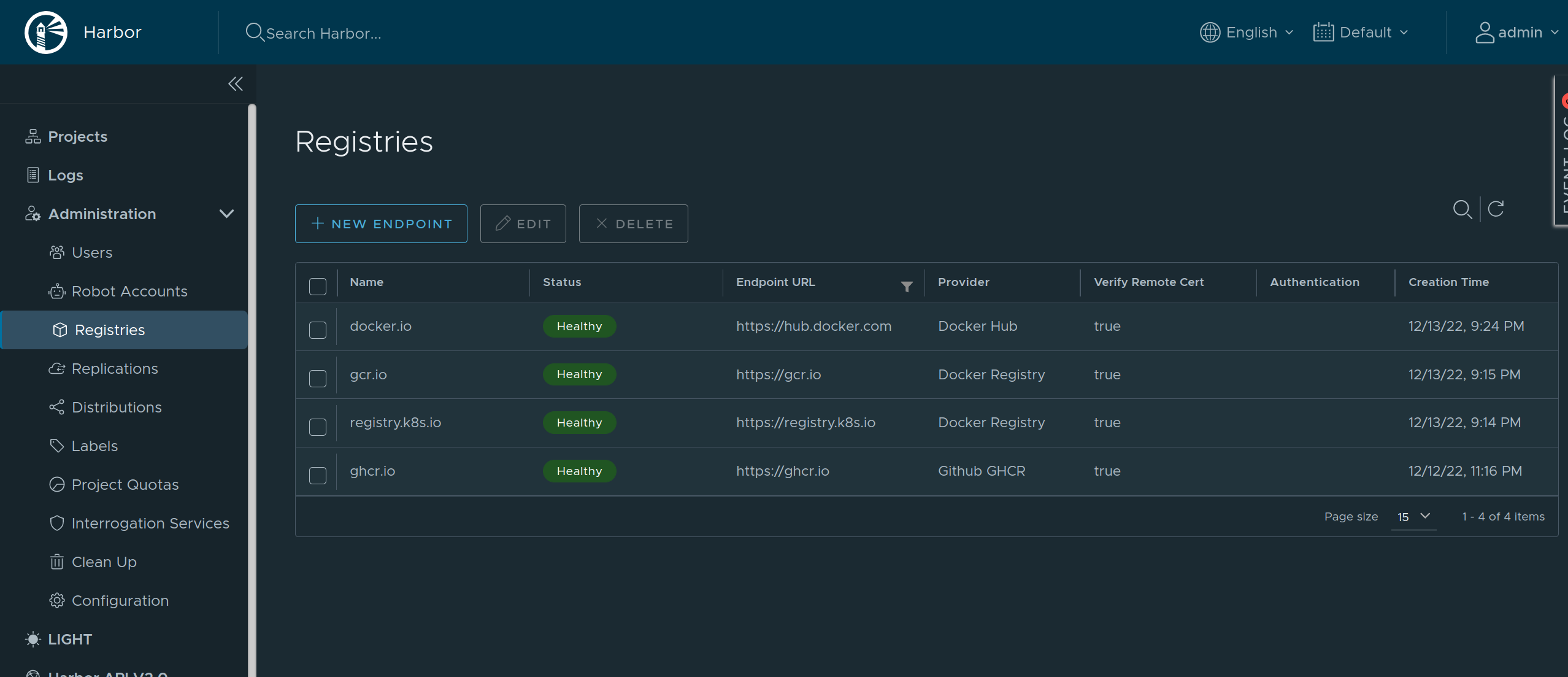
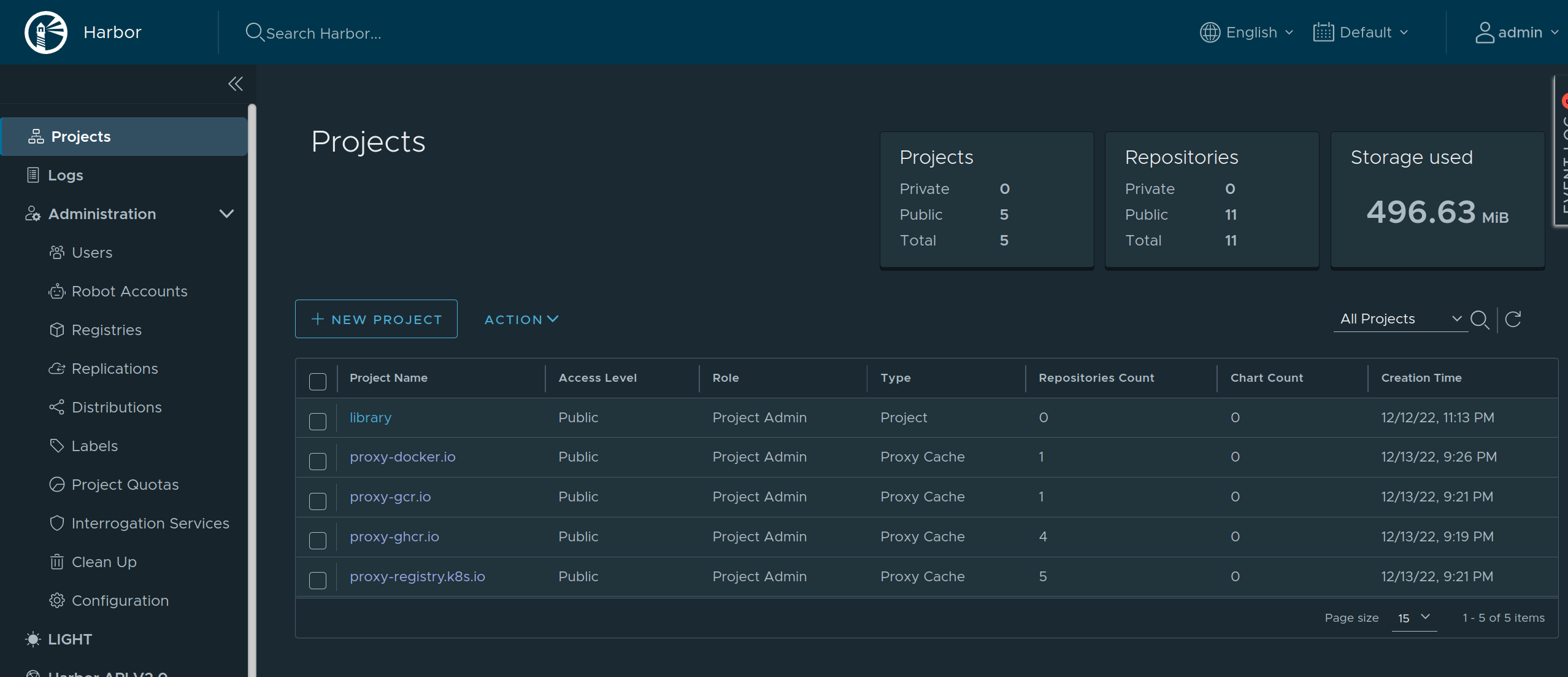
[Harbor](https://goharbor.io/) is an open source container registry that can be used as a caching proxy.
Harbor supports configuring multiple upstream registries, so it can be used to cache multiple registries at once behind a single endpoint.

<img src="https://mintcdn.com/siderolabs-fe86397c/wAMQ5pvBQ6V2OapO/talos/v1.11/configure-your-talos-cluster/images-container-runtime/images/pull-through-cache-harbor-endpoints.png?fit=max&auto=format&n=wAMQ5pvBQ6V2OapO&q=85&s=c1dc963aeab69323644bc424a74b3ed3" alt="Harbor Endpoints" width="2556" height="1103" data-path="talos/v1.11/configure-your-talos-cluster/images-container-runtime/images/pull-through-cache-harbor-endpoints.png" />

<img src="https://mintcdn.com/siderolabs-fe86397c/wAMQ5pvBQ6V2OapO/talos/v1.11/configure-your-talos-cluster/images-container-runtime/images/pull-through-cache-harbor-projects.png?fit=max&auto=format&n=wAMQ5pvBQ6V2OapO&q=85&s=0f2ad8e75f4a64529ded6a3da00795ce" alt="Harbor Projects" width="2556" height="1103" data-path="talos/v1.11/configure-your-talos-cluster/images-container-runtime/images/pull-through-cache-harbor-projects.png" />

As Harbor puts a registry name in the pull image path, we need to set `overridePath: true` to prevent Talos and containerd from appending `/v2` to the path.

```yaml theme={null}
machine:
  registries:
    mirrors:
      docker.io:
        endpoints:
          - http://harbor/v2/proxy-docker.io
        overridePath: true
      ghcr.io:
        endpoints:
          - http://harbor/v2/proxy-ghcr.io
        overridePath: true
      gcr.io:
        endpoints:
          - http://harbor/v2/proxy-gcr.io
        overridePath: true
      registry.k8s.io:
        endpoints:
          - http://harbor/v2/proxy-registry.k8s.io
        overridePath: true
```

The Harbor external endpoint (`http://harbor` in this example) can be configured with authentication or custom TLS:

```yaml theme={null}
machine:
  registries:
    config:
      harbor:
        auth:
          username: admin
          password: password
```
