> ## Documentation Index
> Fetch the complete documentation index at: https://docs.siderolabs.com/llms.txt
> Use this file to discover all available pages before exploring further.

# Subscribe to Security Advisories

> Learn how to subscribe to GitHub security advisories for Omni so you are notified when CVEs are disclosed.

export const VersionWarningBanner = () => {
  const latestVersion = "v1.13";
  const [latestUrl, setLatestUrl] = useState(null);
  const [currentVersion, setCurrentVersion] = useState(null);
  const [isBeta, setIsBeta] = useState(false);
  const parseVersion = v => v.replace("v", "").split(".").map(Number);
  const isGreaterVersion = (a, b) => {
    const [aMajor, aMinor] = parseVersion(a);
    const [bMajor, bMinor] = parseVersion(b);
    if (aMajor > bMajor) return true;
    if (aMajor === bMajor && aMinor > bMinor) return true;
    return false;
  };
  useEffect(() => {
    if (typeof window === "undefined") return;
    const {pathname, hash, search} = window.location;
    const match = pathname.match(/\/talos\/(v\d+\.\d+)\//);
    if (!match) return;
    const detectedVersion = match[1];
    if (detectedVersion === latestVersion) return;
    setCurrentVersion(detectedVersion);
    if (isGreaterVersion(detectedVersion, latestVersion)) {
      setIsBeta(true);
    }
    const newPath = pathname.replace(`/talos/${detectedVersion}/`, `/talos/${latestVersion}/`);
    setLatestUrl(`${newPath}${search}${hash}`);
  }, []);
  if (!latestUrl || !currentVersion) return null;
  return <div className="not-prose sticky top-6 z-50 my-6">
      <div className="border border-yellow-500/30 bg-yellow-500/10 px-4 py-3 rounded-xl">
        <div className="text-sm">
          {isBeta ? <>
              ⚠️ You are viewing a <strong>beta version</strong> of Talos ({currentVersion}).
              This version may be unstable.
              <a href={latestUrl} className="ml-2 underline text-yellow-400 hover:text-yellow-300 font-medium">
                View latest stable version {latestVersion} →
              </a>
            </> : <>
              ⚠️ You are viewing an older version of Talos ({currentVersion}).
              <a href={latestUrl} className="ml-2 underline text-yellow-400 hover:text-yellow-300 font-medium">
                View the latest version {latestVersion} →
              </a>
            </>}
        </div>
      </div>
    </div>;
};

Omni publishes security advisories on GitHub when CVEs are disclosed. You can subscribe to receive notifications directly so you're informed as soon as a new advisory is published.

To receive security advisory notifications for Omni:

1. Navigate to the [Omni repository](https://github.com/siderolabs/omni) on GitHub.

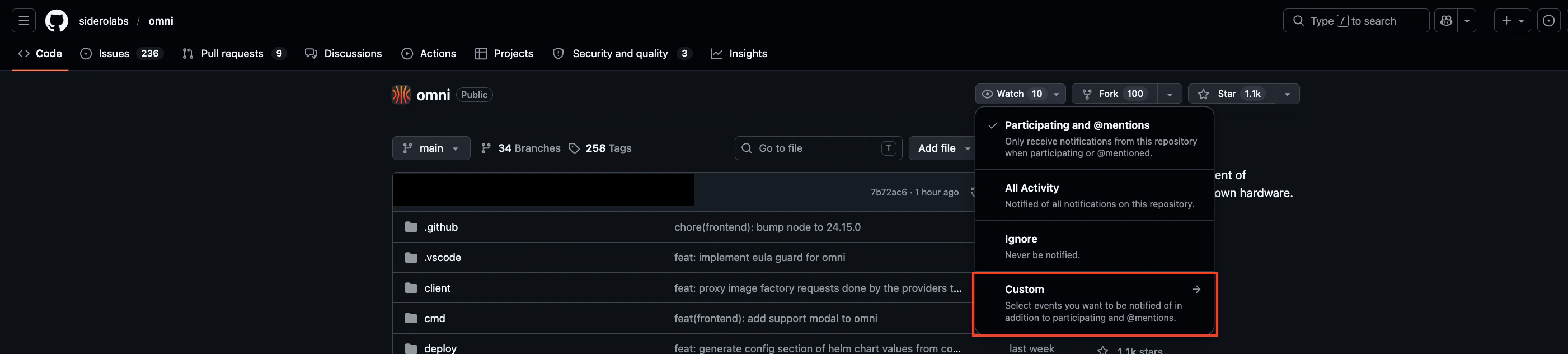
2. Click the **Watch** button in the top-right area of the page.

3. Select **Custom** from the dropdown menu.

<img src="https://mintcdn.com/siderolabs-fe86397c/katEM9KA-fqB7DgO/omni/security-and-authentication/images/subscribe-to-security-advisories-watch-custom.png?fit=max&auto=format&n=katEM9KA-fqB7DgO&q=85&s=a9f126d4b15327f246a680f96b62063c" alt="Custom Button" width="2802" height="632" data-path="omni/security-and-authentication/images/subscribe-to-security-advisories-watch-custom.png" />

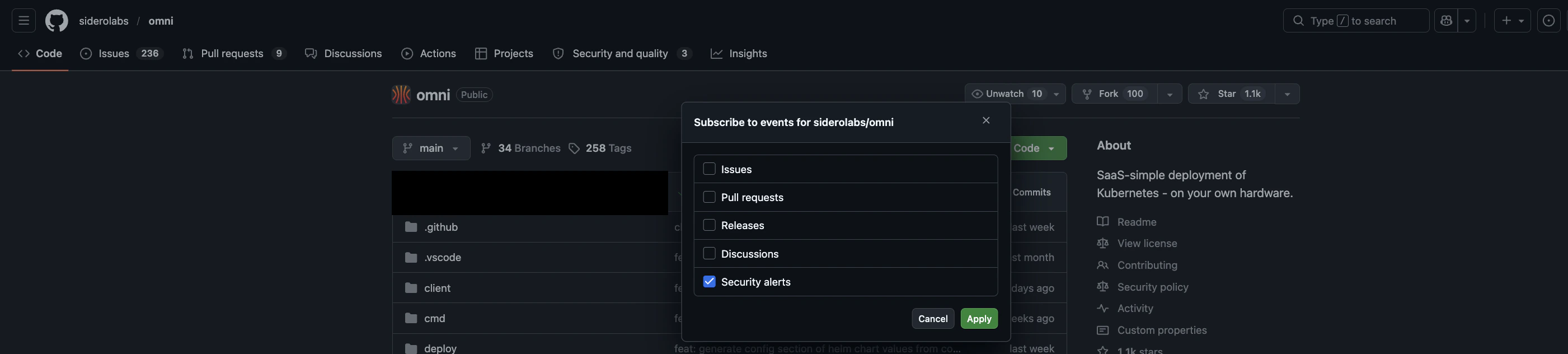
4. Check **Security alerts**.

5. Click **Apply**.

<img src="https://mintcdn.com/siderolabs-fe86397c/katEM9KA-fqB7DgO/omni/security-and-authentication/images/subscribe-to-security-advisories-security-alerts.png?fit=max&auto=format&n=katEM9KA-fqB7DgO&q=85&s=125daf204bc59459fef59ebdb3139d6e" alt="Security alerts" width="2802" height="632" data-path="omni/security-and-authentication/images/subscribe-to-security-advisories-security-alerts.png" />

You will now receive a GitHub notification whenever a new security advisory is published for Omni.

<Note>
  You need a GitHub account to subscribe to notifications. You can manage your [notification preferences (email, web, etc.)](https://github.com/settings/notifications) in your GitHub notification settings.
</Note>

## What a security advisory Contains

Security advisories include the CVE identifier, affected Omni versions, severity rating, and the version the fix is available in. You can also view all published advisories at any time under the Security tab of the Omni repository.