> ## Documentation Index
> Fetch the complete documentation index at: https://docs.siderolabs.com/llms.txt
> Use this file to discover all available pages before exploring further.
# Expose a Workload via Service Proxy
> Expose HTTP services from Omni-managed clusters using workload service proxying.
Omni's workload service proxying feature lets you expose HTTP services running inside your managed clusters directly through Omni.
Exposed services are protected by Omni's authentication, so only users with at least `Reader` access to the cluster can access them. This is useful for cluster-internal tools like Grafana or the Kubernetes dashboard that you want to access without setting up a separate ingress or VPN.
On self-hosted Omni, workload proxy requires DNS, TLS, and routing to be configured before it works. See [Enable Workload Proxy](../self-hosted/enable-workload-proxy).
To expose a workload via service proxy you must:
* Enable workload service proxying on the cluster.
* Annotate the Kubernetes service you want to expose.
* Access the exposed service from the Omni left navigation.
Workload service proxying only supports HTTP services. Raw TCP and UDP are not supported.
## Enable workload service proxying
Workload service proxying must be enabled on a cluster before you can expose services from it.
To enable workload service proxying on new and existing clusters using cluster templates or the Omni UI:
Add the following to your cluster template YAML:
```yaml theme={null}
features:
enableWorkloadProxy: true
```
For more information on configuring cluster features with cluster templates, see the [Cluster Template reference documentation](../reference/cluster-templates).
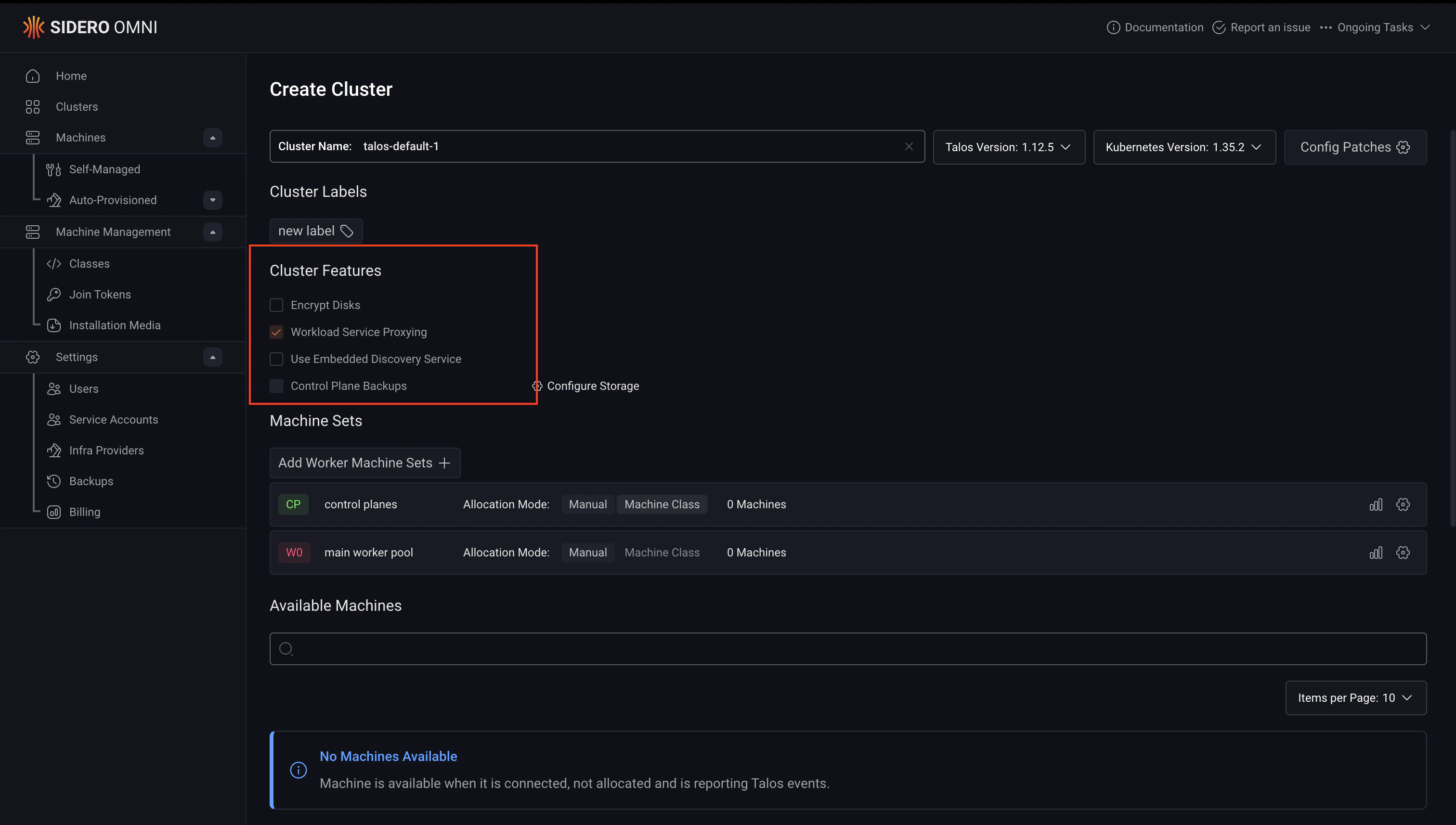
On the **Create Cluster** page, check **Workload Service Proxying** under **Cluster Features**.
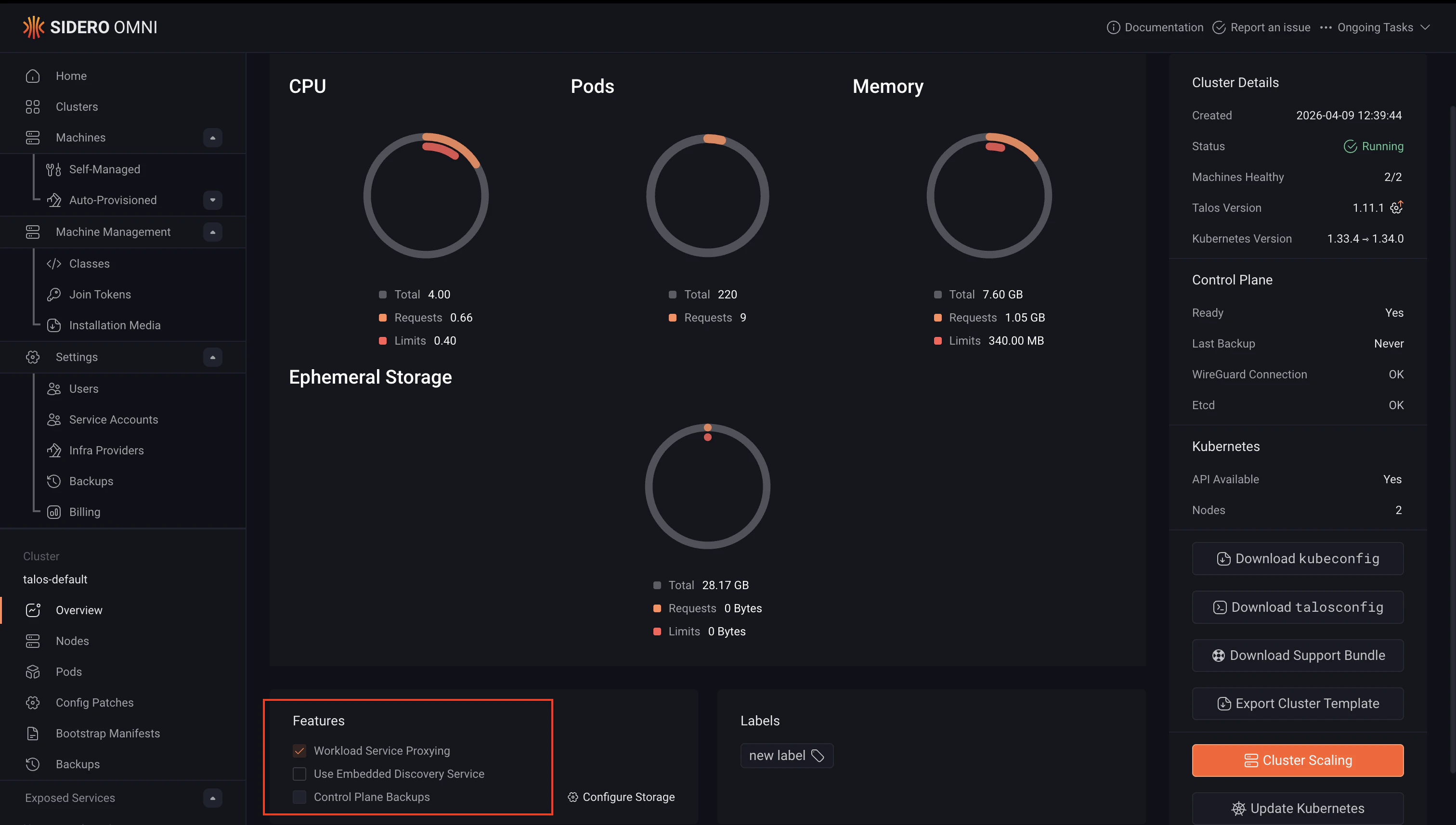
Open the cluster overview page and check **Workload Service Proxying** in the features section.
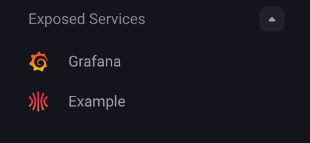
Once enabled, an **Exposed Services** section will appear in the left navigation when that cluster is selected.
## Expose a Kubernetes service
To expose a service, annotate it with `omni-kube-service-exposer.sidero.dev/port` set to an unused port on your nodes. The following example deploys a sample Nginx workload and exposes it through the workload proxy.
The Deployment below is a minimal Nginx workload used for demonstration purposes. The Service is what controls how the workload is exposed through Omni, pay attention to the annotations.
```yaml theme={null}
cat <Each entry is either a bare host port (e.g. `30080`) or a `host-port:service-port` pair where the service port is a port number or a port name (e.g. `30443:8080` or `30444:https`). Each host port must be unused on all nodes. The selected Kubernetes Service port must use the TCP protocol. |
| `omni-kube-service-exposer.sidero.dev/label` | A human-readable name shown in the Omni left navigation. Defaults to `.`. |
| `omni-kube-service-exposer.sidero.dev/prefix` | A fixed URL prefix. If not set, a random alphanumeric string is used. |
| `omni-kube-service-exposer.sidero.dev/icon` | An icon displayed next to the service in the Omni left navigation. Accepts a base64-encoded SVG or a base64-encoded GZIP of an SVG. |
When the bare host port form is used, the entry maps to the first port defined on the Service. To select a specific service port on a Service that defines several, use the `host-port:service-port` form.
To encode an SVG icon for use with the annotation:
```bash theme={null}
gzip -c icon.svg | base64
```
### Exposing multiple host ports
Exposing a Service on multiple host ports requires Omni 1.8.0 or later. On earlier versions, the `port` annotation accepts only a single bare host port, and the per-host-port suffixed variants of `label`, `prefix`, and `icon` are ignored.
A single Service can be exposed on multiple host ports by listing several entries in the `port` annotation. Each entry produces its own exposed service with its own URL in Omni.
A common case is a workload that serves a user-facing UI on one port and a Prometheus metrics endpoint on another. For example, given a Service that defines port `8080` (named `http`) and port `9090` (named `metrics`):
```yaml theme={null}
metadata:
annotations:
omni-kube-service-exposer.sidero.dev/port: "30080:http,30090:metrics"
```
The `label`, `prefix`, and `icon` annotations accept per-host-port suffixed variants in the form `-`. The suffixed variant wins for that host port, and the unsuffixed annotation is used as a fallback for any host port that does not have a suffixed variant set.
```yaml theme={null}
metadata:
annotations:
omni-kube-service-exposer.sidero.dev/port: "30080:http,30090:metrics"
omni-kube-service-exposer.sidero.dev/label: My App
omni-kube-service-exposer.sidero.dev/label-30090: My App (metrics)
omni-kube-service-exposer.sidero.dev/prefix-30080: my-app
omni-kube-service-exposer.sidero.dev/prefix-30090: my-app-metrics
```
When the unsuffixed `prefix` annotation is set on a service exposed on multiple host ports, it is claimed by the lowest host port. Other host ports get an automatically generated alias derived from it, so there is no duplicate-prefix conflict.
Bad or duplicate entries in the `port` annotation are skipped individually rather than failing the whole annotation. Check `omnictl get exposedservices` for any per-entry errors.
## Access an exposed service
Once annotated, the service will appear under **Exposed Services** in the left navigation when the cluster is selected. A Service exposed on multiple host ports shows up as one entry per host port. Click the service name to open it in Omni.
The service URL uses the suffixed `prefix-` annotation if set, otherwise the unsuffixed `prefix` annotation, otherwise a randomly generated prefix. For a service exposed on multiple host ports, the unsuffixed `prefix` only applies to the lowest host port, and the other host ports get an automatically generated alias derived from it.
## Examples: exposing cluster tools with the workload proxy
The workload proxy is particularly useful for cluster-internal tools that you want to access through Omni without exposing them publicly or setting up a separate ingress.
The following examples show how to install and expose two common tools, Grafana and the Kubernetes dashboard, using Helm and the workload proxy annotations.
### Grafana
[Grafana](https://grafana.com/) is an open-source dashboarding and observability tool commonly used to visualise metrics from Prometheus and other data sources running in a cluster.
To install Grafana and expose it through the workload proxy, run this command to create a `values.yaml`:
```yaml theme={null}
cat < values.yaml
service:
annotations:
omni-kube-service-exposer.sidero.dev/port: "53000"
omni-kube-service-exposer.sidero.dev/label: Grafana
omni-kube-service-exposer.sidero.dev/prefix: grafana
EOF
```
Then install the Grafana Helm chart:
```bash theme={null}
helm repo add grafana https://grafana.github.io/helm-charts
helm install -f values.yaml grafana grafana/grafana
```
### Kubernetes dashboard
The Kubernetes dashboard is a web-based UI for managing and inspecting resources in a cluster. To install it and expose it through the workload proxy, create the following `values.yaml`:
```yaml theme={null}
cat < values.yaml
web:
serviceAnnotations:
omni-kube-service-exposer.sidero.dev/port: "58888"
omni-kube-service-exposer.sidero.dev/label: Dashboard
omni-kube-service-exposer.sidero.dev/prefix: dashboard
omni-kube-service-exposer.sidero.dev/icon: H4sICHhlYmAAA2xvZ28uc3ZnALVaXW/jypF9n1/B9X1JsCLV3x/yeILFXgQIkKdNFvssS7QtjD4Mih7P3F+fc6qblDyenZtgsQ5yRySb3dVVp06daunjn74e9s2XfjjvTse7G92pm6Y/bk7b3fHx7ua///7nNt0053F93K73p2N/d3M83fzp04eP/9a2zX8O/Xrst83rbnxq/nL8fN6sn/vmD0/j+LxaLl9fX7tdvdmdhsflH5u2/fThw8fzl8cPTdNg3eN5td3c3dQXnl+GvQzcbpb9vj/0x/G81J1e3lyGby7DN1x996XfnA6H0/Esbx7Pv1wNHrYP82ha82plkM45L5VZGtNiRHv+dhzXX9u3r8LGH71qlFJLPLuM/OdGrc5w6DP+Pw+fbnTn08uw6R/wXt8d+3H5699/nR+2qtuO26tpJn++WfWNk4/rQ39+Xm/683K6L++/7rbj091NNKZLzke599TvHp9G3FS6yyHYcne3vbuB8UYuroChy9M66Wp+ojqXOtcMOdssQybrV9vThubc3exPj6ducsg8Q//1+TSM7cNu35dhy6fToV+OT6fN591xeR42y88v9/0Ar2A3x/61ez7+eIqv22d41gXVZa+U/uGYb9+N+YRBH7f9w5mDy6555W6apTyad0Hbtl92/etl4P36XLzaNM/rRyBwfxrubn55kL/64P40bPthehTk782jE6K0G7+VnKtzTzZz1vm5+vHz89N6e3q9uzHfP/ztdDpg1tDprLzK3z/efMU7MXY+JK/fPaQ9Hg+dy+77h4jnC7OyfTnuRiD/+eu711+GgQP26289tv1olZ/MOz+dXh8Heu9hvZ/dN7/5ujtiN22Fqfb6nd11xATaZN5tvI7A/t5vrD7D9oz/X54d1l93h91vPUx85/Dzcf3cPu5P9+v92w087Ea8ODzuju14eobl6v2Dff8w/vjJUPbyo0f3p3GUOKoJkYd+XG/X4/qCw+lOFDRjCPhs9V+//rlc4XqzWf3PafhcL/HHAev70wsWvfk03/643azAQIf1+Gl3ALRIXv8Oxvm4vDx4M3j89txfJi3TDn2hsh/y+XZz2PGl5d/G3X7/Fy5St3U16W7c95ebH5fV+rq35dXmPi6nrcvV43fR2q/ve8Tpr0Rh8w4Kj8Pp5flw2pKYOOLm4lC5nl4Yh/XxzN3f3cjHPYrdH9rQWRNUdmbR6ui66I374+T+x2k/nKuAf97N83p8urjsPH7bY31w3371Cybc9P6WF23N+pW+PY/D6XO/qqxSL0uCrNR0Ca/2wx6wHVduuvf9FO12Da4YhvW31REl/OZiBSHU2OA7q41f6OS6hA/NunGhi8YFoxf4ZJ3B50bJ/7DpLquA4a7zfK3ZN61xDqNsxBygnfg7MxjfGa6zsLrjS81fG0zqFz7nLooB//GT141FAeNSwRa7fzY2dByXYaMOueOaRquy+k9ttKFsbgHDqole2Y7LphC64MPvWOltrm5KLneGE0SVUGWTWI5PnPVnM0Sdikc0XqGTUbm4fmuC6X4vSLOL28nHU5Q4A4NEQ366/ntY/HaFHAKciAbG/fXtuRCcjsd+M56GFiXhy3p8GfoLq74Z+U4FXBf6H48t5d541f148TcVvw674pW3mfgvmHzZc36fRLGL1oawMCAFDAim2TRt6lQMOSxSZ/rWIXlcB0zgRuxM9FlPdxaICDys+9YvVKdtjLZB2TfJ4NKEbB0vEQ5cOsKqgTRUWueF7ozONsg1ELYwiGyq1xxvmY6YMgM2C9/pGBoNBlN5kbmOy41ZaFuwiifGYtEFc0RBrzRAWtA6AgNdCNHyXVpranpwlaBTyFg2B48NQl1iAiC3CzE67I8MuaDYKEyhKk9AnBCA4qIYg+wzmqijEEzQxmIV+DFFThoEw2CcsnULCoouaLg1GKNT00bYERW3nzCxVZgme1l04cFTkmwtbNfekLc7reA0GuecVhZZAm7IGktJ3sgNvgFnam4fVnv4Tx57hWTBDD6ZTOslo7EvISVkqUgnveDcygcsok3nuRGsS6kcuLCuec0aUpILK1rlcuLSXjmduVjIycLegMlhMfYk3uc8RtzHZbOOhutHOCDSZOONT9xkUs7LxHzHTF6wcGJGhHDHuegjTQ5ZRdmzcQq7xPzFODvtCpvJPmWuo0FtjhtPBh/giaBsond1oUWCTKIN+xXcphFri5cSl3aGmNSeRKh8Y4tRIOUCEGJYMA7PRaLWRcVLrVRMTd01r+voHMBYRE7SiI7BeIfc0ri22mJ2JQRmCgO6TgcECxmBnIRjCCJ4F/nntQP2jdSH2CnxE2DpIvbilE66ocWIRUTSpKQSEkMT17rSLPMEnYXBUvAJQAzgwCkJWweUM02TfaaJi12BjZuzAISNdSEqgO0YbKC3QM0qJJAHoZRBzK3JEhAkrC4FhGVBzNa1cm4KzJ1l9iTkCL2esncae7HBMZ1CwXgoqYjk6YAYzTcs3E1O4m6dcXAVAOGzZGDxvSslF4BICt5lZuSsPfGAN1CyEByoIy/EVtyvO3mD/zBDGUXJWTKVigwfKCRGGloqpqpsRApzJhAOKstVgk2kRS38pmUsF5GHCC4vtZc3tXdeXnVR3p2gU2YmcSjtxEmGA2At2p7oSH1KBcla0TM1PQumyNsIv7WNMKTFDMxugDU2oEiugAdSWmWlsBCadiRzpIAvlwLtYk9laY7OUdJLoQRzdELI5Trk3KipmitBJ3lapSTXJnhLno4GRYM3fID5tsDhwkuAl7LWkRaszaAleiAgf4V3YgazW3GoZC13DK6JdQCykBsEL4NsLPmIQAGqQbELwgfrsU4kMch7ZxpyStSaDtYMVyplS+pE0TOhapGab5uGlTAi2xYOWZdQ+hp+0A5eT8wvEG+TZp2pqvjbC5CEeGRGTMQOPzomI/jNMfmUtpIAwA+dZxWsZ00GFxupWTYBPBEJQiwhAwG4yOzWFh8ABuwP7sWUcGy2M3qT1CTUEikNyBhvMYsGv2hOk6okLohgbGJixVbkUmYEEKVZsmMUQ7QgyHYTUUefkoOdyAJWdM2lgiMm2Vo0U04aVZM/Eg0yg8sxpYaiIoHkhbYzfNCYidlTV+hWVYhqERjGx3KZ06Q3rhCqnFzVXKxXhvNcjfIelC4l1gEJdLaz8Ar95ZxAt+rSKmwRnGhYcR0JVzFa8B5qOyuM9sCym3IFUSjaB4wGUQXbUEWZxg35Ckm4YF3NOivkJ0WO1EFSF5QIOLxznmGGbRFljvUBQilpqYSkLOBHGfZ1UiKDA7ZskcBtAKwsA0MGgh3KgKEjSNhAJVG8eVHOWmUJYW2RmGQeecAlIY+85BDsdY7b9eB03xTijyWPalUD6BILK0jZspQgtSyAlhCepmSppxBoRFj4DFaDpwBKT7p2rMnAC9yC3qWWmaLWsIGE6o1EAXQRYhQYWLxA4qWANCOp1Yo5aSb6LNrEGTKUEEss1BpzJ2CAZWz8Yo4L5A1oiOurpLPISXAwNqAge6bIi7JiTUKOE9vJJcfiy/JhmCwRHVYkUkvYUy2xkULXFzoCYyPQESJwQaKOqEFzNrRzOjDhkEFZ0OgT5R1REQWNUFRBbpSa005ZByxo1FoJEBYITGyIi8j4QOG6dEnsWfJwjLeAMUGLaOWqoUwWuIF3POubruSH5e0k4DTzETzJfABEpDIoSnDWdRakRhdaTl2YtmSjEG2wTmbF9lMSwWmMJGfRO2TygkKnGEUnyyYMDWhFOwMoYJfoJVFOoWSTq1DXKnS1GUhZ6q2Bnw3ABSHkeZ0iG44goa/sDVwgA6W8gKcjcYFoleqC/Adxz4qyVJdSR42IA6loJGc2DuBTrGdLbWFpofTEwlQ4aE5YSVhQCCNDkaenhKg2K+yUGWHQBWRmCIZRF3hAcy6LqhR1qboiNzFGiq61C9Ggbi65teKyEHt5qNkhU4FqeahDvhKmQoIIFRalDgWSmQaiKZMT2EWEe9IK7SQWCHrFCNEtoJ5C/s4KeCBSqf2rILk0DMwuS66lqaAKkfYkvdINZCpuyc9WixZHpyB0juoPMQ3uhDtzaR1M0FeCrZ0UGyY2VFGsPFFzPvaB2coQ5Gu4VobtJA3JnsnIW6Bik0rXJG2WY9oZkaAc60VKTMcTfkpFXUvDhgoeDR6mMoaCTmo5PMsXoQ2MZkmT9YSjJ6bATNYl8JzkWXKxbI6CFWnskNjAHtvKWEVJG2w1A30Iao7YwHqfG56YIKGFH8CVWtKg7DZUuoYy0EEKnKH0JwgotDzD5cnftd6KbQgnQiWPHYpvJn5hl8ksZgAHWLm0Fu3cW1CZahY3Nmxo7ti4JEk2J/BL0rqIAmqn7kUxPAUJQGCURt4UJgSpQdHbmS0r07MwoUmjYR4IEYEIlVH4y4CjzdyttVO7JloxpKIItVNJ/IwFtDStGRoVqDRTydfddGaQhXwAPAwRzoVEQHZpcgA2WFrWq44VZZaFAyFhbmAxdmwLli9ns7TFsv1LX8xiYcADUErGSzcCmkDVj1KsME+86sF1nNpcKsGgdKm9SpaCq6WlhEZm1kjiKulRqo5t6zmDrXfQgVlBMFt56mLFHjs6uMNBK7Q8jzDeSYuhCUDCzYtSsNK4WBFlTLAUpbPBDSd0DiTzgGQ6Q2nnUxhWMaBQmn6Qo/RnaE+KlgGAUX2pr0oY4hwG9JlaCltCt0oaA7xErfCM2wElU0vfzgc+PGcppxuYVc6SQFyEDfplqCdUAtFpueoB5awILh1D2Z1iJOln9Dd6PqRq3XRmgFD2reN0KDosZjxPSdSackKGbm0+Mit3mt+ag/BS6TVLeMUBxUkxVDah2wqhl6U20hVSFVMPAfGC52wl3GbqjbUpXd18g8oB6mahRPEHk0UGg1p5GhTnDCnKq5x41TIi+0O9rSznJo2FziejKbN0DD5Bi6OfdnLWRU9b8psCzKMpQGttrsFAYqI7L/omGSVdKZwWhI0Ujxe1v1gkBtFbth5gYw+iaqGI0CNgwWzQhQR8QA1HEmSqJjg8RfG3k2PnvewBV26G0aWVZaXcSEa46KQ38qyPRISFXLE8e3E8j5dDvso/9WwuosIYXkPFMMsNu7Ao2IBQsKJrJgBfObc4s1beggVX7I1UKnBSOcFfeF1Wqq8UNMBaEjrPVCjIodXZSzioJAm5idnVI08YPNvJ1hL6RgnM0OeoRDmCtk8qW5XcRRLvrxakt6ItB6gs3kIV7Hoo96xj86YpnSzKObMbaIoWItXoUvmzryDkNtHbVNKve9+AsT3bXM2+BsKbDXVm27EwqPXgBSe6o5ykhqrDMFaB6aSFYdPd8LzWAVMCO/rDloLncn1jTzKTGjDFfwpBdShdIFlO3tfKiZBAmaJUgYmeR3VtniqWrn082cgokeY8MZfTPDSXhryntYEb3NQohUrX+wt/TEmNYJdDjCJhKh7UdDJZ14IsKN/uqGY6fr/SDgyPqRrLFPWtp/nlxiTdCq34crxa3+CK0RfEhZKw5UQCf6W3RvUApKCWvRxX2cziXPqCqXztm0Ia87ZiqO4qdCSnfOywvXyHBhnMYz4ed2ATCwDD8dRSvjEqE+N9P50XAgxVK+i5baNjF4Wp5DASYPZswdkRZzl/Qk8ixB7RKFftT/4t1Ao5QKCJlIzKaaqLqGrjlSOI3pXzT2rWdAmMifOJ35yMgEyUQz5ofnbxit9O8aBUeyOHtOX0p4JRUKP59QNA46nhWbjQDUBklWQvJT5Ox6UXqV7jzdwQrpiKN4wCHVLR8UtJJ6WTXx1m9oDO8gwJTEvfTvVU+iXH2aMciGkztRdv6w3P4pzXJaze8UQCvhH9bpEmpoJyYlRxUphaFiuxTJiGHZtzhfSik7xAyyxOBPmzq5/OXaezaQ8JpOVUAB1Dw9OAEMnFOlqdKUlTaaGqg0rf09hYfQUiKrggE6M7ozxCj2uZxRBkKi9Ew1b5V8+1a7oAi4GnYkFqJbIlyGGbEbp16PPbNO/blfpiaw4H+beZ6FN2bkykEuZRvoMDMas3PN8C5YC0IwtgLa/h/XeW03fup+PYnne/9atDv929HG7LDT5cHflbh32582U97NbH8c29V/nxyZtb53Hox83TdG/sv47t7rjt8aYqV+v97vG4Oo/rYSw3tv3mNKzH3ekoX8jf7nfHvv6uZZpm349jP7T8Jdfu+DjdfT0N2+/vyYzzTxXKhNvd0G9k/v043N7vT5vP7fNwehz6M3+ztRrvb1+H3YhZWv4OYrUfWtwqxh43T6ehWsvfOYlx56fdw7iaLm/lV02rX5T83ZYfMdSfKfwrP2JAvP8Pv2O4PayHz/1QPn/ZnXf3uz2Hy8c9nXB+3mPs7ig2n770w8P+9Do/749r/NPerzef+YuQ43a13mxeDi/8mUcJ7cP6sNt/W/0Nvr1tp++J2xL1536ze9htShQ54hpo80/H4Fz+6uV8d7Opf+fyn/O5fpzuzRfXt86X8d+PPl9P9v3b72c8X/33/d/b4fPVP/V1fbecvhP/f/zW/uPysfzsB/985K+TPn34ByiQtmK5KgAA
EOF
```
Then install the Kubernetes dashboard Helm chart:
```bash theme={null}
helm repo add kubernetes-dashboard https://kubernetes.github.io/dashboard
helm install dashboard -f values.yaml kubernetes-dashboard/kubernetes-dashboard
```
## Troubleshoot exposed services
To view the status of all exposed services and check for configuration errors, run:
```bash theme={null}
omnictl get exposedservices
```
Check the `ERROR` column in the output for any issues with a specific service. A common cause of errors is a port conflict — the value of `omni-kube-service-exposer.sidero.dev/port` must be unused on all nodes in the cluster.
Omni deploys a workload proxy component into each cluster with workload service proxying enabled. You can inspect its logs for lower-level troubleshooting:
```bash theme={null}
kubectl logs -n kube-system -l app.kubernetes.io/name=omni-kube-service-exposer
```
 The service URL uses the suffixed `prefix-