> ## Documentation Index
> Fetch the complete documentation index at: https://docs.siderolabs.com/llms.txt
> Use this file to discover all available pages before exploring further.
# Create a Hybrid Cluster
> Create a hybrid Talos cluster across networks using KubeSpan.
export const version = 'v1.13';
A hybrid cluster is a Kubernetes cluster whose nodes span multiple networks or infrastructure types, for example, a mix of bare metal machines, cloud virtual machines, or on-premises virtual machines.
Kubernetes requires all nodes can reach each other directly without NAT. When nodes are spread across different networks, this assumption breaks down. Kubespan addresses this by establishing an encrypted WireGuard tunnel between every node in the cluster. The tunnel flattens the network so all nodes can communicate securely regardless of where they are hosted.
## Prerequisites
Before proceeding, create a cluster with nodes across your intended infrastructure. To learn how to create a cluster, follow the [Getting Started with Omni guide](../getting-started/getting-started).
## Enable KubeSpan
Once your cluster is created with nodes spanning multiple networks, enable KubeSpan to allow those nodes to communicate.
KubeSpan can be enabled via a config patch, applied either through the Omni UI or a cluster template.
To enable KubeSpan using a cluster template, add the following patch to your cluster template definition:
```yaml theme={null}
patches:
- name: kubespan-enabled
inline:
machine:
network:
kubespan:
enabled: true
```
For more information on patching Omni clusters inline or with patch files, see the [Cluster Template reference documentation](../reference/cluster-templates#patches).
From Talos v1.13, KubeSpan can be enabled using a multi-document config patch:
```yaml theme={null}
apiVersion: v1alpha1
kind: KubeSpan
enabled: true
```
Apply the patch to your node, replacing the placeholders with the values for your environment:
```bash theme={null}
talosctl apply \
-f \
--insecure \
--node \
--patch @
```
| Placeholder | Description |
| ------------------------- | -------------------------------------------------------------------- |
| `` | The machine configuration file for the node. |
| `` | The IP address of the node you want to apply the patch to. |
| `` | The multi-document patch file containing the KubeSpan configuration. |
Refer to the Multi-document patching documentation for more information on how to use the multi-document configuration.
To enable KubeSpan using the UI:
1. Navigate to your cluster in Omni.
2. Click the **...** button next to the cluster you want to patch.
3. Select **Config Patches** from the dropdown.
4. Click **Create Patch** to open the **Create Patch** page.
5. Apply the following patch:
```yaml theme={null}
machine:
network:
kubespan:
enabled: true
```
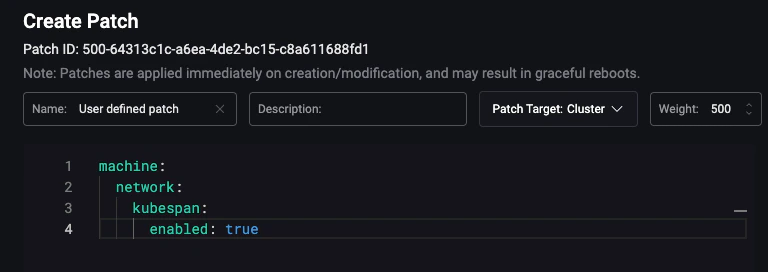 Once this patch is applied, all node-to-node traffic in the cluster will be encrypted using WireGuard, allowing nodes to communicate with each other securely regardless of which network they are on.
WireGuard encryption adds overhead that reduces network throughput compared to a native network connection. If nodes on the same network need native throughput performance, configure `filters.excludeAdvertisedNetworks` to exclude same-network traffic from the WireGuard tunnel.
Once this patch is applied, all node-to-node traffic in the cluster will be encrypted using WireGuard, allowing nodes to communicate with each other securely regardless of which network they are on.
WireGuard encryption adds overhead that reduces network throughput compared to a native network connection. If nodes on the same network need native throughput performance, configure `filters.excludeAdvertisedNetworks` to exclude same-network traffic from the WireGuard tunnel.