> ## Documentation Index
> Fetch the complete documentation index at: https://docs.siderolabs.com/llms.txt
> Use this file to discover all available pages before exploring further.
# Virtual Networks
> Create and manage the VLAN-backed virtual networks that VM network interfaces attach to, and import networks from Cisco ACI.
Talos Director is in Limited Availability. Limited Availability customers receive full production support and work directly with Sidero Labs engineering during onboarding. General availability is planned for January 2027, and the console is changing quickly until then, so details on these pages may differ from what you see.
To request access, visit [siderolabs.com/getdirector](https://www.siderolabs.com/getdirector).
A virtual network in Talos Director is a VLAN carried on a bridge on every host. VM network interfaces attach to a virtual network, and because the network exists on all hosts, a VM keeps its connectivity when it migrates from one host to another, including between clusters.
The **Network** section of the console also holds Talos Director's firewalling (security groups, policies, and the policy simulator). Those are covered in [Security](/director/security/security).
## The Networks view
Navigate to **Network** > **Virtual Networks** (`/networks`) to see every virtual network.
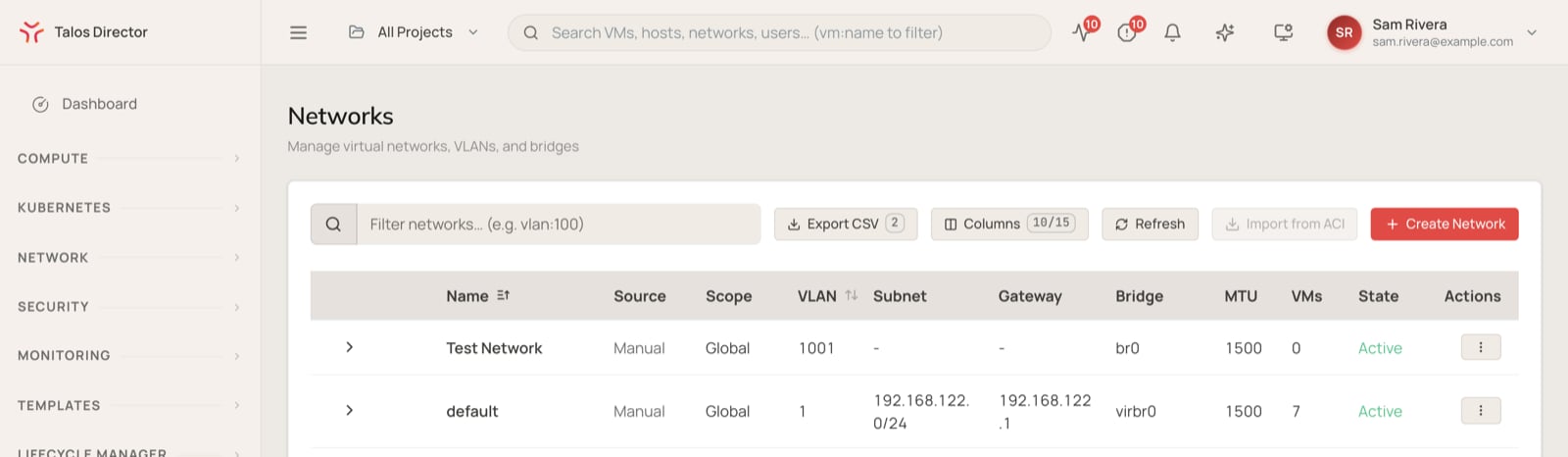 | **Column** | **Description** |
| - | - |
| **Name** | The network name. Expand a row to see the network's status on each host. |
| **Source** | Where the network came from: created manually, or imported from Cisco ACI. |
| **Scope** | Which hosts the network is configured on. |
| **VLAN** | The VLAN ID that carries the network's traffic. |
| **Subnet** | The network's address range, in CIDR notation. |
| **Gateway** | The network's gateway address. |
| **Bridge** | The bridge on each host that the network uses. |
| **MTU** | The maximum transmission unit for the network. |
| **VMs** | The number of VMs with an interface on the network. |
| **State** | Whether the network is active. |
| **Actions** | The row-level menu for network operations. |
The controls above the table work like those on the other inventory views: **Filter networks...** (for example `vlan:100`), **Export CSV**, **Columns**, and **Refresh**, plus **Import from ACI** and **Create Network**.
## Create a virtual network
Select **Create Network** and fill in the following fields.
| **Field** | **Description** |
| - | - |
| **Name** | The network name. |
| **Description** | An optional description. |
| **Project** | The project that owns the network. |
| **VLAN ID** | The VLAN that carries the network, from 1 to 4094. VLAN IDs must be unique across the whole installation. |
| **Bridge Name** | The bridge on each host that the network uses. |
| **Subnet (CIDR)** | The network's address range, for example `10.20.0.0/24`. |
| **Gateway IP** | The network's gateway address. |
| **MTU** | The maximum transmission unit, for example `1500`. |
| **Enforce ACLs** | When selected, traffic on this network must be allowed by a firewall policy. See [Security](/director/security/security). |
A new network is configured on every host in every cluster, so the physical switch ports your hosts connect to must carry the VLAN.
Changing a network's VLAN ID or bridge means reconfiguring every host. Plan it as you would any change to the physical network the VMs depend on.
## Import networks from Cisco ACI
If your data center runs Cisco ACI, **Network** > **ACI Integration** connects Talos Director to your APIC controllers, read-only. Enter the address of the first APIC controller, the fabric name, and a username and password, then select **Test Connection**. With **Enable EPG Import as Talos Director Networks** turned on, saving the configuration imports your ACI endpoint groups (EPGs) as virtual networks. You can also import them later with **Import from ACI** in the Networks view.
## Services and tags
* **Network** > **Services** defines named network services (a protocol and its ports) that firewall rules can refer to, instead of repeating port numbers in every rule.
* **Network** > **Tags** manages the tags you attach to VMs. Security groups can select VMs by tag, so tagging a VM can be enough to put it under the right firewall policy.
This documentation is built and hosted on [Mintlify](https://mintlify.com), a developer documentation platform.
| **Column** | **Description** |
| - | - |
| **Name** | The network name. Expand a row to see the network's status on each host. |
| **Source** | Where the network came from: created manually, or imported from Cisco ACI. |
| **Scope** | Which hosts the network is configured on. |
| **VLAN** | The VLAN ID that carries the network's traffic. |
| **Subnet** | The network's address range, in CIDR notation. |
| **Gateway** | The network's gateway address. |
| **Bridge** | The bridge on each host that the network uses. |
| **MTU** | The maximum transmission unit for the network. |
| **VMs** | The number of VMs with an interface on the network. |
| **State** | Whether the network is active. |
| **Actions** | The row-level menu for network operations. |
The controls above the table work like those on the other inventory views: **Filter networks...** (for example `vlan:100`), **Export CSV**, **Columns**, and **Refresh**, plus **Import from ACI** and **Create Network**.
## Create a virtual network
Select **Create Network** and fill in the following fields.
| **Field** | **Description** |
| - | - |
| **Name** | The network name. |
| **Description** | An optional description. |
| **Project** | The project that owns the network. |
| **VLAN ID** | The VLAN that carries the network, from 1 to 4094. VLAN IDs must be unique across the whole installation. |
| **Bridge Name** | The bridge on each host that the network uses. |
| **Subnet (CIDR)** | The network's address range, for example `10.20.0.0/24`. |
| **Gateway IP** | The network's gateway address. |
| **MTU** | The maximum transmission unit, for example `1500`. |
| **Enforce ACLs** | When selected, traffic on this network must be allowed by a firewall policy. See [Security](/director/security/security). |
A new network is configured on every host in every cluster, so the physical switch ports your hosts connect to must carry the VLAN.
Changing a network's VLAN ID or bridge means reconfiguring every host. Plan it as you would any change to the physical network the VMs depend on.
## Import networks from Cisco ACI
If your data center runs Cisco ACI, **Network** > **ACI Integration** connects Talos Director to your APIC controllers, read-only. Enter the address of the first APIC controller, the fabric name, and a username and password, then select **Test Connection**. With **Enable EPG Import as Talos Director Networks** turned on, saving the configuration imports your ACI endpoint groups (EPGs) as virtual networks. You can also import them later with **Import from ACI** in the Networks view.
## Services and tags
* **Network** > **Services** defines named network services (a protocol and its ports) that firewall rules can refer to, instead of repeating port numbers in every rule.
* **Network** > **Tags** manages the tags you attach to VMs. Security groups can select VMs by tag, so tagging a VM can be enough to put it under the right firewall policy.
This documentation is built and hosted on [Mintlify](https://mintlify.com), a developer documentation platform.